Skip to the page
Clip Lab

Podcast to Shorts, Reels and TikTok

Automatic post-production for multi-camera video podcasts

Clip Lab turns your episode’s camera and mic files into editor-grade clips for Reels, TikTok and YouTube Shorts, and the full YouTube episode, the same day. For about a tenth of what an editor costs.

Private: only the people a show’s team has added can sign in. Nothing to upload: Clip Lab reads each file from your Dropbox or Google Drive.

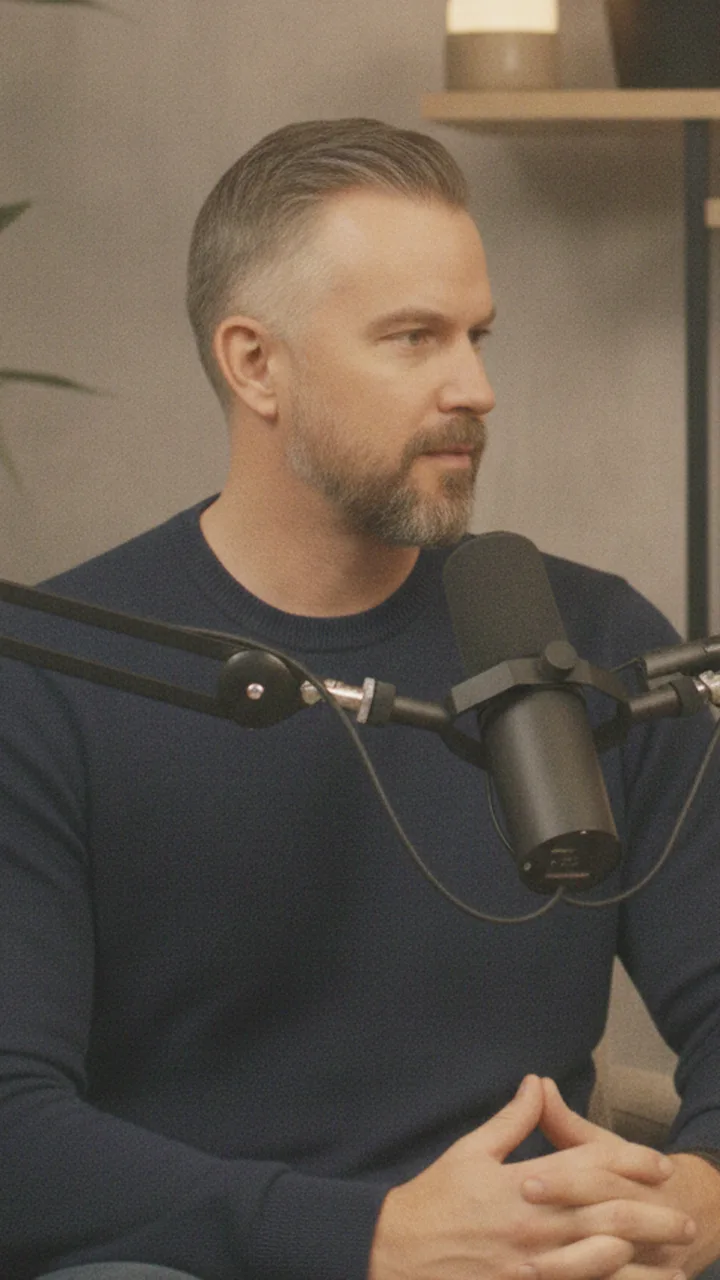
A podcast host at his microphone, in a vertical 9:16 frame.

The 9:16 framing Clip Lab gives whoever is talking, shown on an AI-generated person.

People shown are AI-generated.

Not just auto-clipping

It picks clips the way your show would

Clip Lab doesn’t cut clips by rule. AI reads each episode’s transcript with your show’s own profile, its DNA: what the show is, who it’s for, its hosts, its voice and its topics. Every pick and every post’s words start from it, and it gets more personal with every lesson you save.

  1. Your show’s DNA, in every pick

    Your show’s profile goes into everything the AI is asked, with the lessons you’ve saved, so the picks sound like your show and no one else’s.

  2. Smarter with every episode

    From your feedback, the sound you choose and how your posts did, Clip Lab suggests lessons for your show. Save one, and every pick after it follows it.

  3. Yours to approve

    Nothing it learns changes a thing until you save it, and each clip it proposes says why it was picked.

The intelligence layer

ask knows your show, and gets things done

Ask about your episodes and clips in plain words, on any page. ask knows your show’s profile and what you’ve talked about before, and it acts through the same actions as the buttons, asking first before it makes or changes anything.

  • Find where anything was said or talked about, across every episode
  • Find more clips, or a longer cut
  • Take a line out, rename a clip, put words on screen
  • Change a clip’s sound, its song or the music level
  • Rewrite the post text, make new covers, get a post ready
  • Suggest a lesson for your show
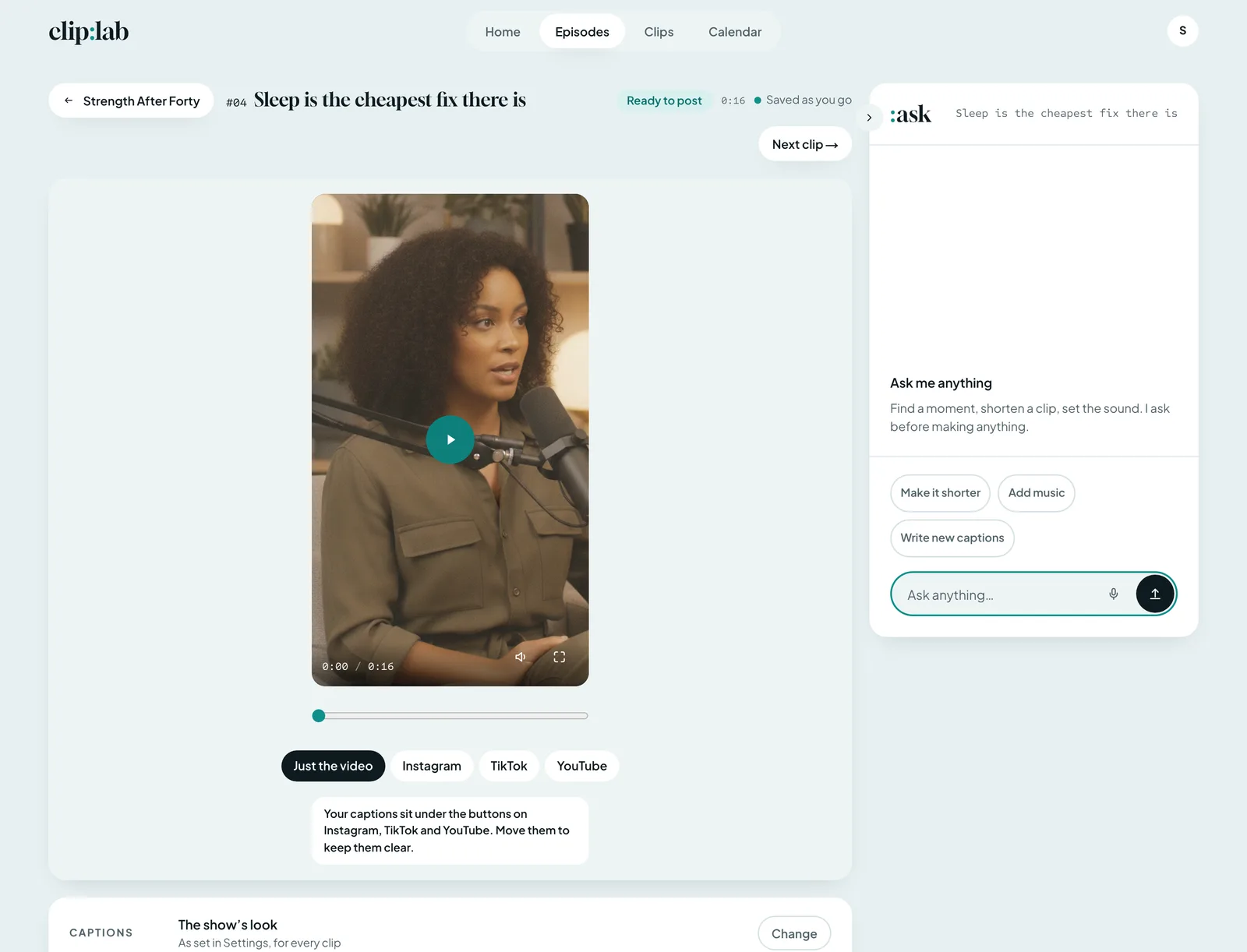
A clip’s page in Clip Lab with :ask open beside it: Ask me anything, its quick asks for the clip (Make it shorter, Add music, Write new captions) and the Ask anything field.

ask open on a clip’s page.

People shown are AI-generated.

Multi-camera podcast editing

Other tools crop one video. Clip Lab cuts from every camera.

Simple clip tools start from one finished video, so their camera switching is a crop of the wide shot. Clip Lab starts from each camera’s and mic’s own file, with the same multi-camera rules an editor uses, and nobody needed to run them.

  • Every camera’s own file

    Each camera and mic is read from its original file and lined up with the rest. Whoever is talking is on screen, from their own camera, framed on them in 9:16.

  • Cut on the exact frame

    Every cut lands on its frame and moves to the quietest point near it, the sound crossfaded.

  • Your frame rate, kept

    Clips play at the rate your cameras recorded. Film-rate 23.976 footage plays at exactly 24, every frame kept.

  • Never blown up or sharpened

    No picture is enlarged past what a 1080p camera needs to fill a vertical frame, 1.78 times, and nothing is artificially sharpened.

How it works

From camera files to finished clips

No timeline to learn. Every page has one obvious next step, made for someone who isn’t an editor.

  1. Pick the folder

    Choose the episode’s folder in Dropbox or Google Drive. Clip Lab transcribes it and lines every camera up with the mics.

    • Each camera’s and each mic’s original file
    • Nothing uploaded: the files are read where they live
    • Turn it on, and new recordings in your Dropbox folder start an episode by themselves
  2. Keep, skip or trim

    Clip Lab proposes clips from the transcript in the lengths you ask for, starting with the moments you remember. Each says why it was picked, and you decide.

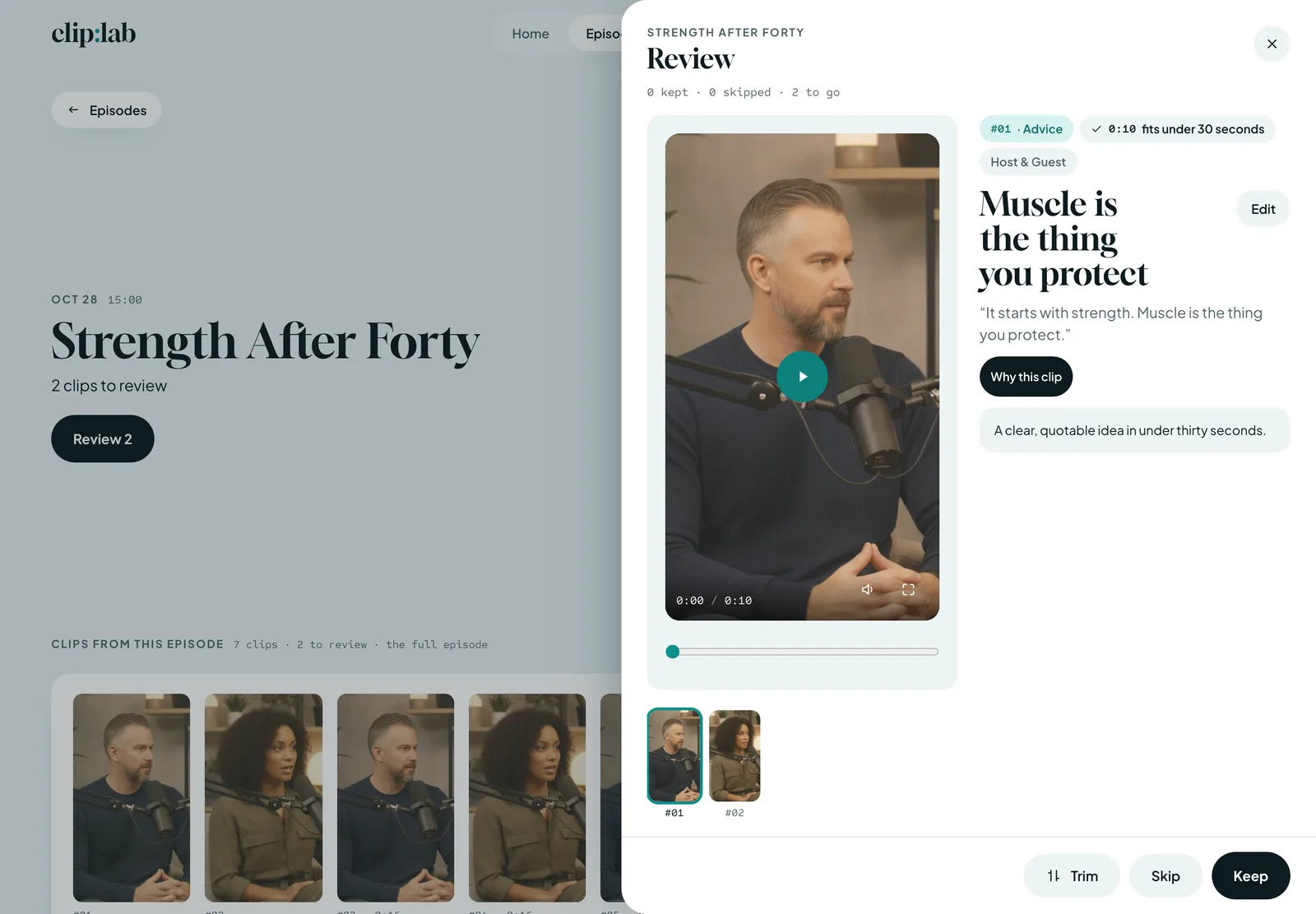
    Clip Lab’s Review over the episode: clip #01, “Muscle is the thing you protect”, 0:10, fits under 30 seconds, on the host, with Why this clip open (“A clear, quotable idea in under thirty seconds.”) and Trim, Skip and Keep.

    People shown are AI-generated.

  3. Finish and post

    Captions, cover, text on screen, sound and each app’s words are ready when you open a clip. Post it now, schedule it or download it.

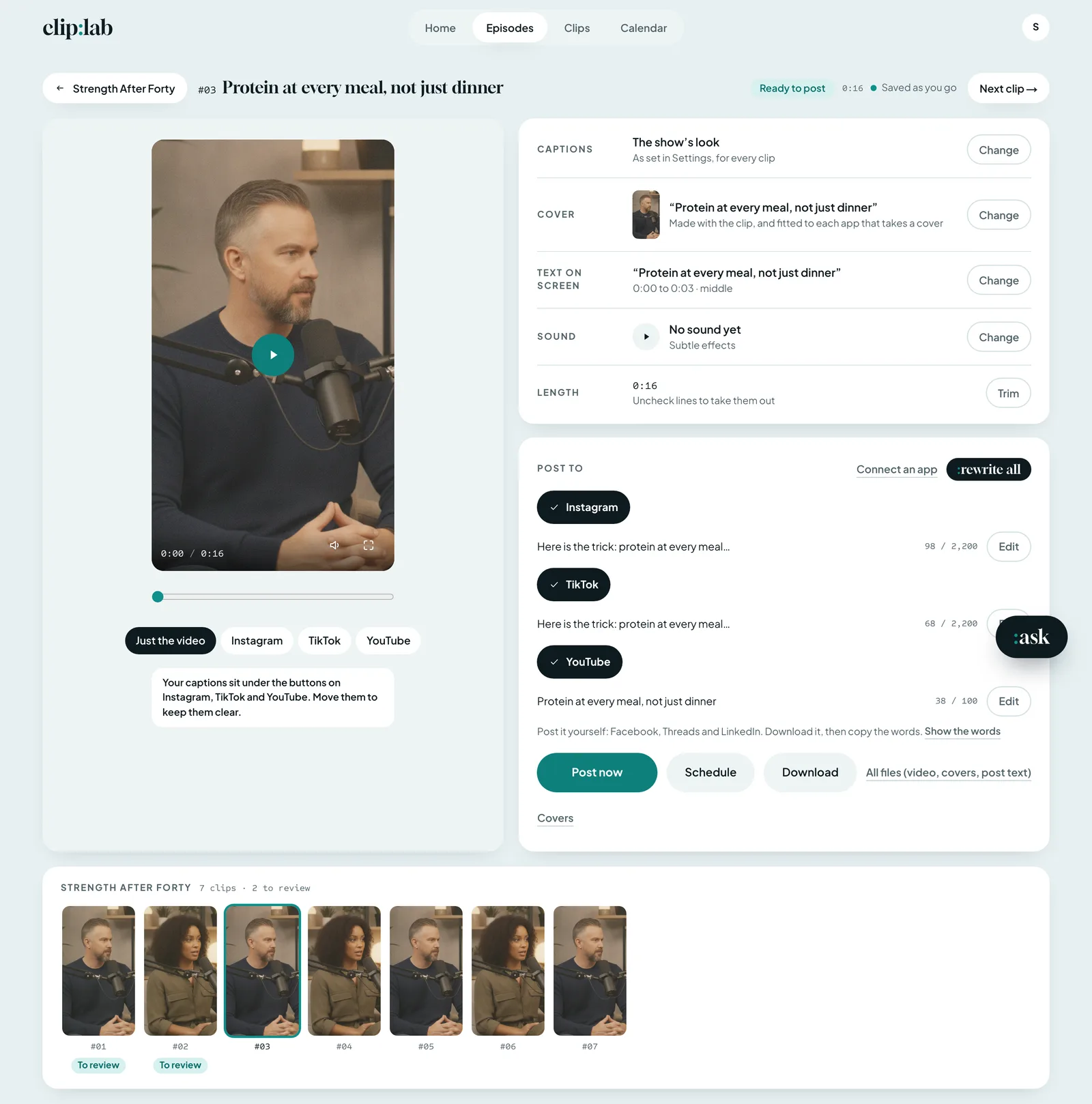
    A clip’s edit page in Clip Lab: “Protein at every meal, not just dinner”, ready to post, the 9:16 player on the host, Captions, Cover, Text on screen, Sound and Length each closed, Post to Instagram, TikTok and YouTube with Post now, Schedule and Download, and the episode’s seven clips.

    People shown are AI-generated.

Post, plan and learn

Plan the whole week. Learn from your posts.

Schedule a week of clips across your apps in one place, then see what worked, and let Clip Lab learn from it.

  • Fill the week

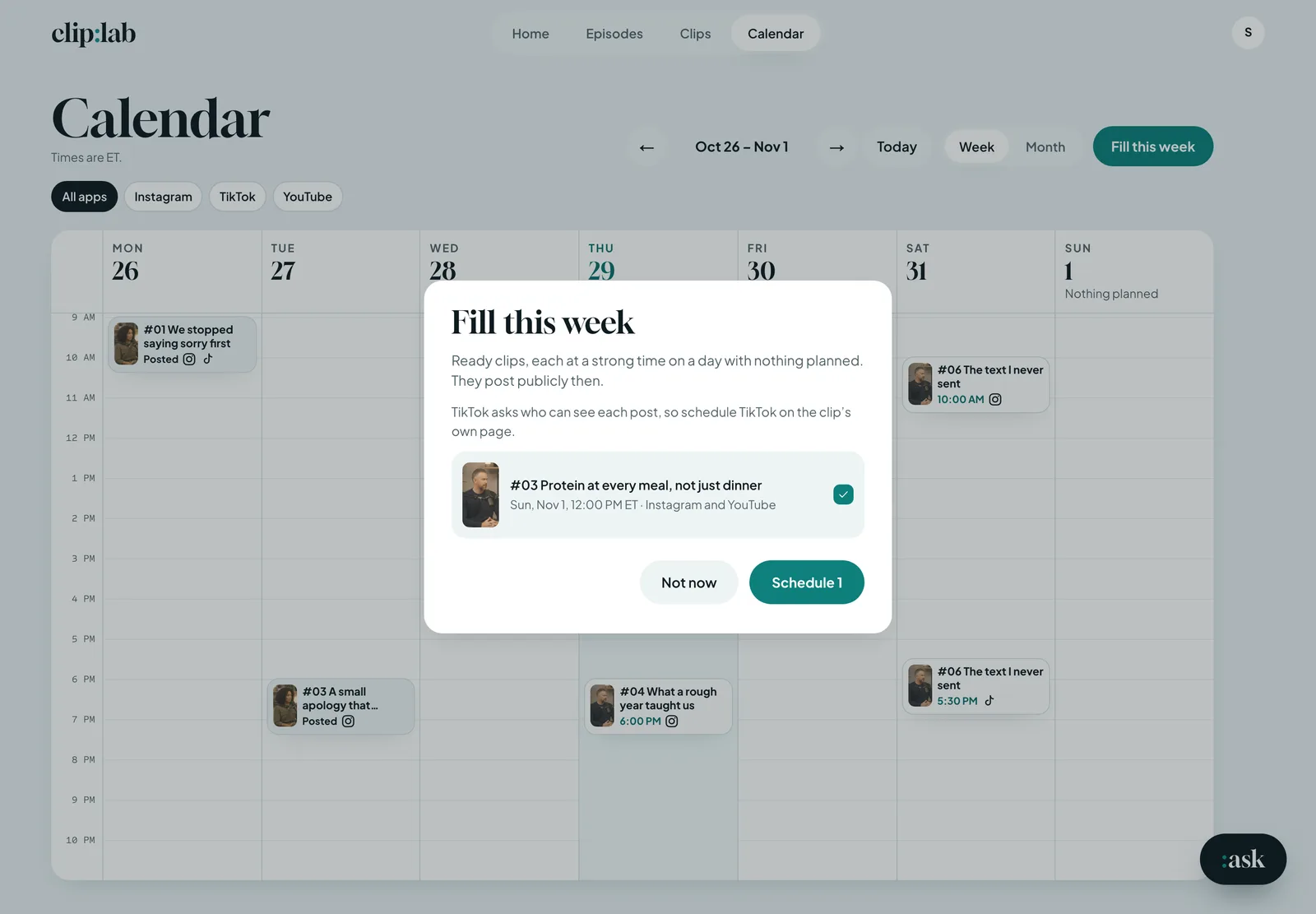
    On the calendar, Fill this week puts each ready clip at a strong time on a day with nothing planned, and the calendar marks each app’s best hours from your own results. Instagram and YouTube post themselves; TikTok gets each clip in your drafts, to finish there.

  • Track every clip

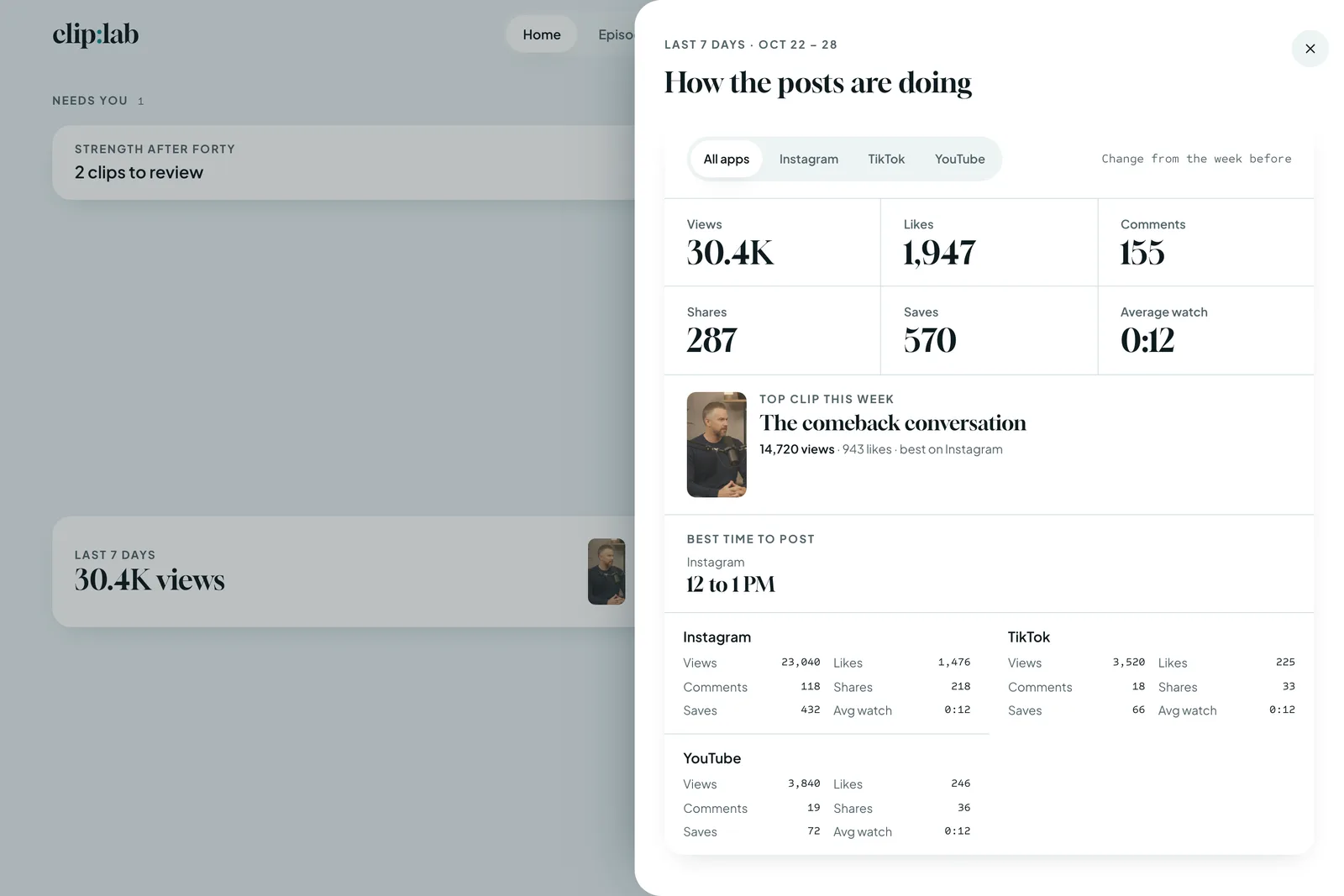
    Clip Lab reads each post’s views, watch time, shares, saves and comments from the app it went to. Home shows your week’s views, likes, comments, shares and saves. Once your show has ten posted clips, those seen often enough are weighed a week after they went out.

  • Learn what worked

    It sets each clip against your show’s own middle and suggests picking more of what held viewers best, showing the posts behind each suggestion. Save it, and every pick after follows it.

Clip Lab’s calendar for Oct 26 to Nov 1 with Fill this week open: “Protein at every meal, not just dinner” set for Sun, Nov 1, 12:00 PM ET on Instagram and YouTube, with Not now and Schedule 1.

People shown are AI-generated.

How the posts are doing, open over Clip Lab’s Home: the last seven days’ views, likes, comments, shares, saves and average watch, the top clip, the best time to post, and each app’s figures.

The figures are a test show’s.

People shown are AI-generated.

What you get

Video podcast clips, finished down to the post text

Every kept clip is made for you, ready to post:

  • Captions burned in, the spoken word highlighted, in your show’s look
  • Timed text on screen, and your show’s watermark
  • Sound effects where they help, and music from the tracks your show holds the license for
  • Three covers with every clip, each fitted to its app
  • Post text written for Instagram, TikTok and YouTube
  • Clips under 30 seconds, 30 to 60 or 60 to 90, and longer cuts: a few minutes, about 20, or the length you name

ComingMusic from your show’s own music library account.

The full YouTube episode

The whole episode, cut from every camera at 16:9, with its title, description, chapters and three thumbnails, posted or scheduled to YouTube. Turn on the teaser to open it with about a minute of its best moments.
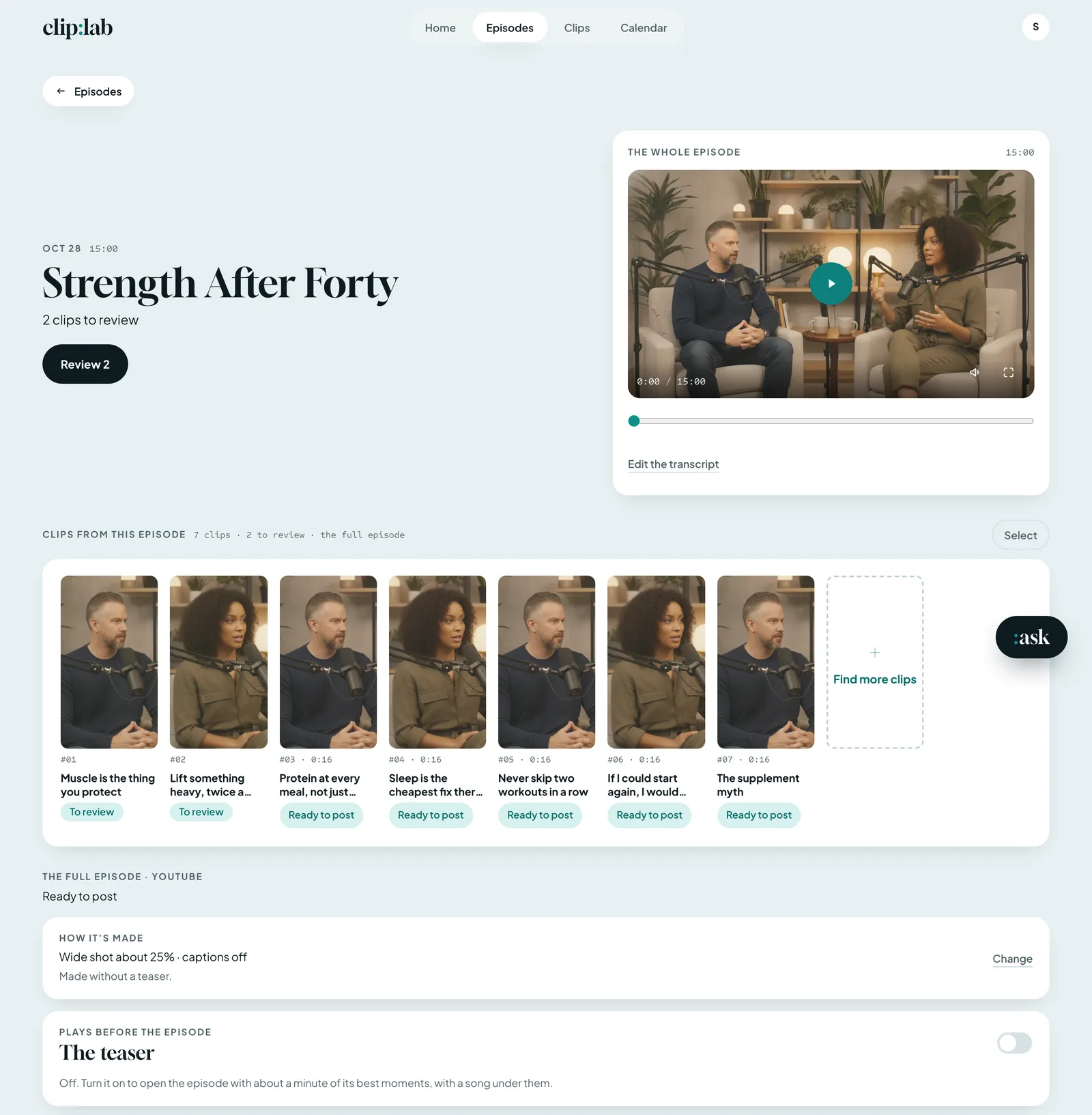
An episode’s page in Clip Lab: “Strength After Forty”, the whole episode’s 16:9 player on a wide shot of the host and the guest, its seven clips, and the full episode’s How it’s made and The teaser.

People shown are AI-generated.

Same day

They give you an editor. We give you finished clips.

A human editor
$150–600
an episode
48–96 hours
to turn it around
Clip Lab
From $49
a month
The same day
clips and the full episode

Same day, consistent, and about a tenth of what an editor costs. Simple tools are easy to run but crop one video; Clip Lab is as simple to run, and built from every camera’s and mic’s own file by an editor’s rules.

Plans

Pricing

One price a month for your show’s episodes. Every plan makes clips and the full YouTube episode.

Billing
  • Free trial

    $0

    One episode, to try it

    • 1 episode
    • 5 clips
    • Clips marked “Made with Clip Lab” Coming
  • Lite

    $49

    A month

    • 2 episode-hours a month
    • 1 show
    • 2 seats
  • Show

    Recommended

    $99

    A month

    • 5 episode-hours a month
    • 1 show
    • 2 seats
  • Studio

    $249

    A month

    • 12 episode-hours a month
    • 3 shows
    • 5 seats
  • Network

    from $799

    A month

    • 40+ episode-hours a month
    • Unlimited shows
    • Unlimited seats

Every plan includes

  • Multi-camera editing, from each camera’s own file
  • Captions in your show’s look
  • Sound and your own licensed music
  • Covers and each app’s post text
  • The full YouTube episode
  • Posting and scheduling
  • ask, the assistant (fair use)
  • Lessons from your feedback and your posts’ results

Music: each show brings its own, the tracks it holds the license for. Coming Your show’s own music library account.

Good to know

Questions

Do I upload my episode?

No. Clip Lab reads each camera’s and mic’s file from your Dropbox or Google Drive folder, and holds a copy only while it works on the episode.

What do I need to record?

Your cameras’ and mics’ own files, in one folder. With cameras alone, their own sound stands in.

Which apps does it make clips for?

Instagram Reels, TikTok and YouTube Shorts, plus the full episode for YouTube. Post or schedule to Instagram and YouTube; TikTok gets the clip in your drafts, to finish there. Every clip also downloads with each app’s words.

Do I need to know how to edit?

No. There’s no timeline. You keep, skip or trim the clips Clip Lab proposes, and every page has one obvious next step.

Where does the music come from?

Each show brings its own: add the tracks your show holds the license for, and Clip Lab picks from them. Connecting your show’s own music library account is coming.

What does the free trial include?

One episode and five clips. A small “Made with Clip Lab” mark on each clip is coming.

Who can use Clip Lab?

Clip Lab is private. Only the people a show’s team has added can sign in.